- Video Production
- Video Making Tips for Beginners
- What is digital video production
- What is the difference between pre-prod, prod, and post-prod
What is the difference between pre-production, production, and post-production?
Pre-production is planning: scripting, storyboarding, and preparing.
Production is filming -- capturing your footage and audio.
Post-production is editing and refining: assembling clips, adjusting color, mixing sound, and polishing the final video.
It's like blueprint, building, and interior design.
Key Takeaways - What is the difference between pre-production, production, and post-production?
- The video creation process is a linear journey: pre-production (planning), production (execution), and post-production (refinement). Respecting this order protects your vision and saves time, money, and stress.
- Pre-production is where you make your cheapest mistakes. A clear script, shot list, and storyboard prevent unfixable problems like missing shots, bad audio, or a weak story later.
- Clean, clear audio is more important than perfect video -- viewers forgive a grainy image but will leave if the sound is poor. Always prioritize sound and shoot a safety take.
- Post-production takes the longest because it requires thousands of micro-decisions to shape pacing, emotion, color, and sound. Budget generous time for this phase; the patience is what turns raw clips into a polished story.
- You cannot “fix it in post” for fundamental mistakes. Overexposed footage, missing angles, or badly recorded dialogue are permanent. Post-production enhances good material -- it doesn’t rescue bad material.
- As a solo creator, you wear all the hats (producer, director, cinematographer, editor), but consciously shifting your mindset between roles -- especially from director to editor -- reduces frustration and improves your work.
- The “Video Roadmap” (Idea → Script → Pre-Production → Filming → Editing → Distribution) gives you a clear, manageable path forward, turning chaos into a calm, step-by-step creative practice.
Imagine standing in an empty field, holding a hammer and a few nails. You dream of building a cozy cottage, but you haven’t drawn a floor plan, bought the timber, or even checked if the ground is level.
If you start hammering right now, you might end up with a structure that leans -- or worse, a pile of wood that doesn’t look like a home at all.
Making a video is very much like building that house. You wouldn’t try to paint the walls before pouring the concrete foundation, right?
In the same way, video creation is a beautiful, linear journey. It follows a gentle flow: first you plan, then you build, and finally, you polish.
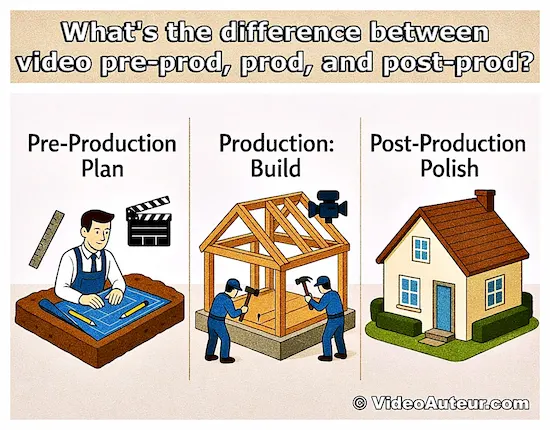
When you understand this natural rhythm -- known in the industry as pre-production, production, and post-production -- it stops feeling like a mountain of jargon and starts feeling like a clear path forward.
As the old saying goes, “First things first.” Whether you’re a student, a self-learner, or just someone with a story to tell, respecting this order is the kindest thing you can do for your project.
It gives you the peace of mind that comes from knowing your foundation is solid, so you can build something truly wonderful without the fear of it wobbling later. Let’s walk through these three stages together, step by step.
What is the difference: pre-production, production, and post-production in video making
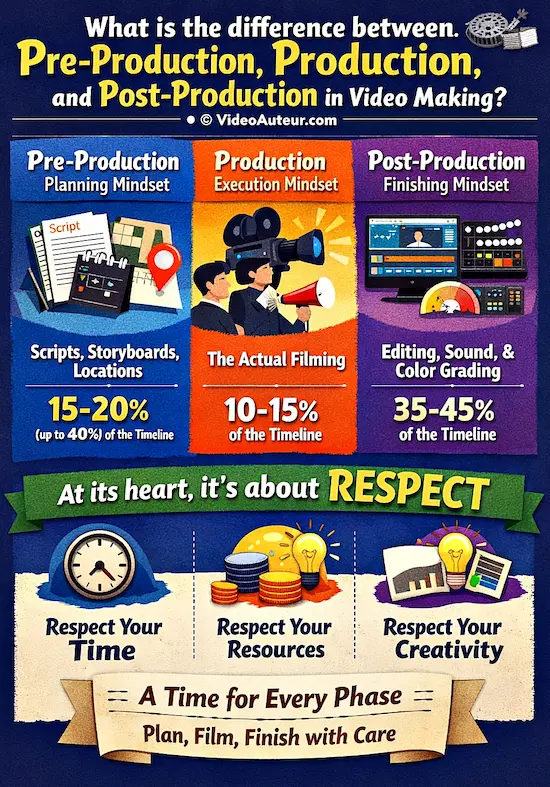
Pre-production is a planning mindset where you prepare scripts, storyboards, and locations.
Production is an execution mindset -- the actual filming.
Post-production is a finishing mindset, transforming raw footage into a finished video through editing, sound design, and color grading.
At its heart, the difference between these three phases is about respect. Respect for your time, your resources, and most importantly, respect for your own creativity.
While it’s easy to see them as just a checklist of steps, they are actually three distinct mindsets. Each one deserves its proper time and attention, just as the old saying goes, "There is a time for everything."
When you give each phase the care it needs, you protect your vision from stress and wastage, allowing you to create something compelling with a clear, calm mind.
Think of it as a gentle journey where each stage has a specific purpose:
Pre-production is the planning mindset.
This is your blueprint phase, where you map everything out before you ever touch the record button.
You write the script, sketch your ideas, scout your locations, and figure out exactly what you need.
It’s the work that happens in the quiet before the storm, ensuring that when you do start, you know exactly where you’re going.
In a well-managed project, this thoughtful preparation usually takes up about 15–20% of your total timeline, or even up to 40% depending on the seriousness of the project.
Production is the execution mindset.
This is the building phase -- the actual filming.
The cameras roll, the lights go up, and the scenes come to life.
It’s the most visible part of the process, the part most people dream of when they think of "making a video."
Yet, despite its excitement, it is often the shortest phase, typically lasting only 10–15% of the total time. It’s simply the act of capturing the raw material you planned so carefully.
Post-production is the finishing mindset.
This is where the magic of storytelling truly happens.
Your raw footage is no longer just a pile of clips; it is shaped, colored, and mixed into a cohesive story.
Editors assemble the pieces, sound designers mix the audio, and colorists adjust the look.
It’s where your vision is finally given life. Because this is where your dream takes its final form, it often consumes the largest slice of your time -- roughly 35–45% of the total timeline.
--
By understanding that these are not just steps, but different ways of thinking, you can move through your project with confidence.
You give each phase its due right, ensuring that your video is built on a foundation of care rather than haste.
What is the "Video Roadmap"? Understanding the order of operations.
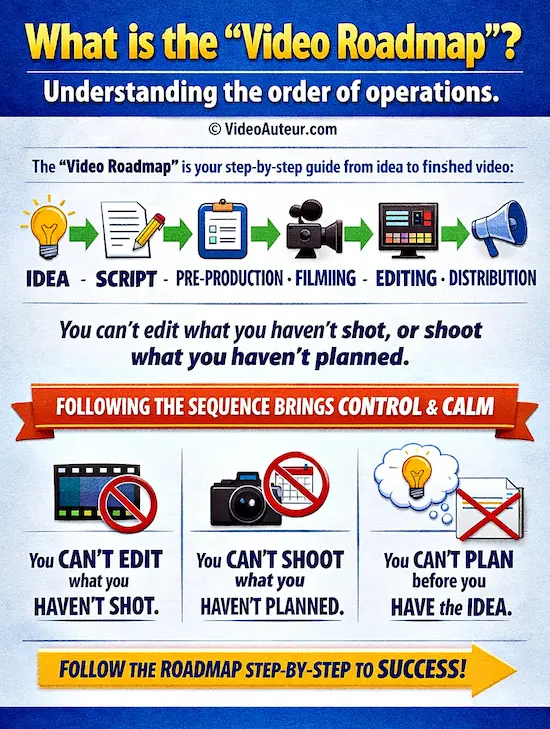
The "Video Roadmap" is your step-by-step guide from idea to finished video:
Idea → Script → Pre-Production → Filming → Editing → Distribution.
It establishes the necessary order -- you can’t edit what you haven’t shot, or shoot what you haven’t planned.
Following this sequence prevents chaos and gives beginners a calm, controllable path forward.
The "Video Roadmap" is simply your chronological guide from the moment a spark of an idea appears to the moment your finished video is ready to be shared.
It is the clear, linear path that answers the most important question a creator can ask: "What comes next?"
Having this roadmap is like holding a travel guide before a journey. It gives you a profound sense of control and calm.
-
Even before you start filming, your brain can see the destination and the route to get there, transforming a potentially chaotic task into a manageable, even exciting, adventure.
- It reassures you that you can do this, because you can see the steps laid out before you.
The most critical thing to understand is that this order is not just a suggestion or a convention; it is a necessity. Think of it as a gentle assembly line where each stage must be completed to support the next:
-
You cannot color grade footage you haven’t shot.
-
You cannot shoot footage you haven’t planned.
- You cannot plan footage if you haven’t figured out the story you want to tell.
Skipping a step or rushing through one phase often leads to feeling "painted into a corner" later on. That’s why grasping this order is the first survival skill for any beginner.
The Map of Your Journey
While a 30-second social media clip moves through this path quickly, and a feature film takes years, every single video follows this same fundamental shape:
Idea → Script/Concept → Pre-Production Planning → Production (Filming) → Post-Production (Editing & Finishing) → Distribution
To keep your mind at ease, it helps to know exactly where one phase ends and the next begins. These boundaries aren't set by the clock, but by actions:
-
Pre-production ends the very moment you press the record button for the first time.
-
Production ends the moment you say "that’s a wrap" and set the camera down for the last time.
- Post-production begins the second you sit at your computer to review your files, and it ends when you hit the final "export" button.
Understanding this flow is the single most powerful shift you can make. It stops you from asking, "Why doesn’t this edit together?" and starts you asking, "Did I plan this shoot well enough?"
That simple shift turns a stressful hobby into a calming, creative practice where you know exactly where you are and where you are going.
What are the main tasks involved in the three stages of video production?
Pre-production is about planning: scripting, storyboarding, scouting locations, and organizing gear.
Production is the shoot itself -- setting up lights, capturing footage and clean audio, and directing performances.
Post-production refines everything: editing clips into a rough cut, adding music, color correction, and exporting the final polished video.
The main tasks in video production are simply the specific actions that turn a quiet idea into a living, breathing story.
Whether you are working alone with just a smartphone or leading a small team of friends, the work falls into three clear buckets.
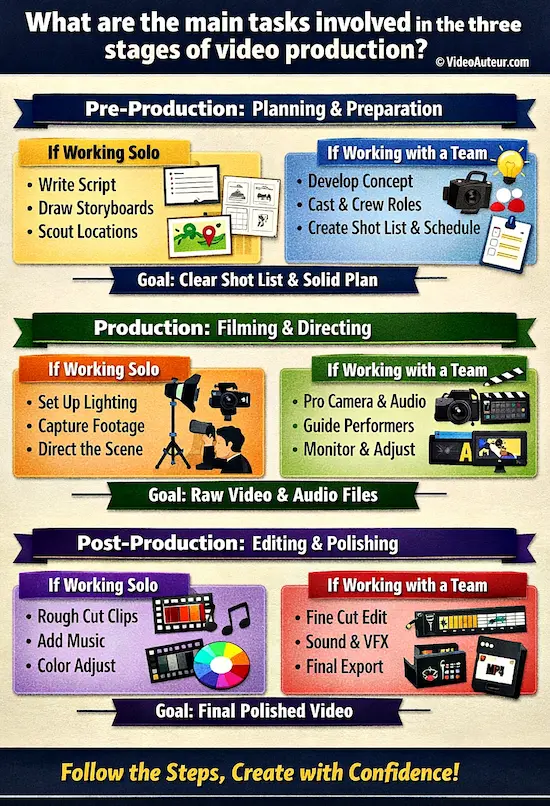
Think of these not as a rigid checklist of chores, but as a gentle guide to what needs your attention at each step.
Here is what the work looks like in practice, tailored to different scales of creation:
Pre-Production: The Planning Mindset
Before the camera ever turns on, your job is to prepare the ground so growth can happen.
If you are working solo:
Your tasks are about clarity. You might...
- write a simple script to organize your thoughts,
- sketch quick storyboards (even stick figures work!) to visualize your shots, and
- scout free locations in your neighborhood.
You’ll also...
- make a list of the basic gear you need, like your phone and a tripod.
If you are working with a team:
The planning becomes more detailed but just as vital. Tasks include...
- developing the full concept,
- writing the script, and
- creating a storyboard and shot list to ensure everyone knows what to shoot.
You’ll...
- scout and book locations,
- cast talent,
- assemble your crew,
- assign roles, and
- create a schedule (often called a call sheet).
Finally, you’ll...
- organize your equipment list and
- finalize your budget.
The Goal: To leave this phase with a clear shot list and a solid plan, so you never feel lost when filming begins.
Production: The Execution Mindset
This is the moment of creation, where your plan meets reality.
If you are working solo:
Your focus is on capturing the moment. You’ll...
- set up your lighting using what you have (perhaps a window and a lamp),
- frame your shots steadily, and
- film multiple takes to get the performance just right.
You might even...
- direct yourself or a friend, focusing on staying calm and present.
If you are working with a team:
The energy is collaborative. Tasks involve...
- setting up complex lighting and camera gear,
- capturing every planned shot from your list, and
- recording clean audio (dialogue and ambient sounds).
You’ll...
- direct talent through their performances,
- review footage on set to ensure quality (checking "dailies"), and
- make real-time adjustments when the unexpected happens.
The Goal: To walk away with a collection of raw video and audio files that tell your story exactly as you planned.
Post-Production: The Refinement Mindset
This is where the magic happens, transforming raw pieces into a polished whole.
If you are working solo:
You’ll sit down at your computer to...
- log your clips and
- build a rough cut, arranging them in order.
You’ll...
- add free music that fits the mood,
- tweak the colors to make them look vibrant, and
- export your final video.
It’s a process of giving shape to your vision.
If you are working with a team:
The work is specialized. Tasks include...
- logging and organizing all footage,
- assembling a rough cut, and
- refining it into a fine cut with tight pacing.
You’ll...
- handle color correction and grading for a consistent look,
- design sound and mix audio,
- add graphics or visual effects, and
- finally export the video in the correct format for its destination.
The Goal: To deliver a final, polished video (like an MP4 file) that feels complete and ready to share with the world.
--
No matter the size of your project, completing these tasks in order ensures that you are never rushing to fix problems that could have been prevented.
By honoring the specific work of each stage, you create space for your creativity to shine without the weight of chaos.
What happens in video pre-production? Setting the stage for success.
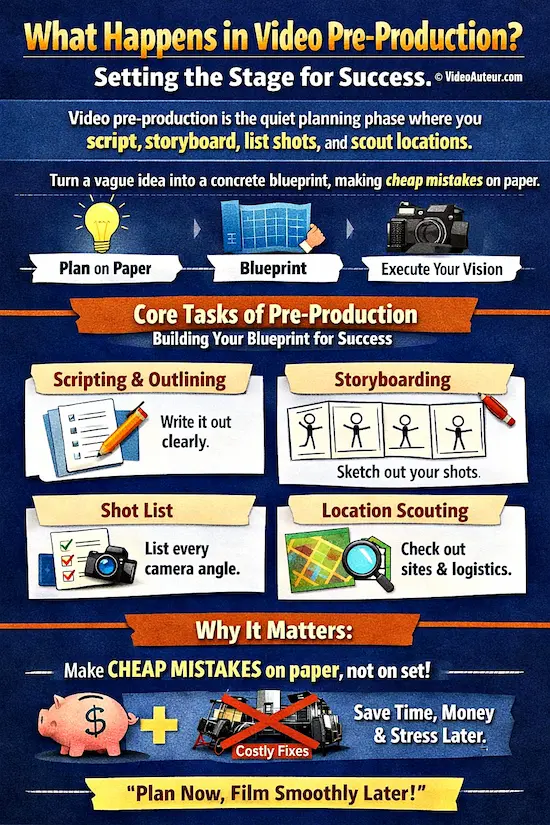
Video pre-production is the quiet planning phase where you script, storyboard, list shots, and scout locations.
You turn a vague idea into a concrete blueprint, making cheap mistakes on paper.
This sets the story and mood so filming becomes simply executing your vision, not guessing.
In video pre-production, you are doing the "quiet work" that happens before the camera ever turns on. This is the phase where you answer the why and the how of your story, turning a vague idea into a concrete, step-by-step plan.
It is your safe space to make mistakes on paper so you don’t have to make them on camera.
Many beginners are tempted to skip this stage because it feels like "homework." You aren’t filming; you’re just writing notes and drawing stick figures.
But here is the gentle truth: this is where the real directing happens. The mood, the story, and the success of your video are shaped entirely in this quiet space.
If you treat pre-production with care, the rest of the process feels like simply painting by numbers.
The Core Tasks: Your Blueprint for Calm
Think of pre-production as building a map so you never get lost. Here is what you are actually doing in this phase:
- Scripting and Outlining: You write exactly what will be said or shown. This isn’t about perfection; it’s about clarity. It ensures you know your story inside and out before you start.
- Storyboarding: You draw rough sketches of your shots. These don’t need to be artistic masterpieces; stick figures are perfectly fine. These sketches act like a comic strip, letting you "watch" your video in your mind before you spend a single dollar on filming.
- Creating a Shot List: This is a simple, structured list of every single camera angle you need. It prevents the panic of forgetting a crucial shot once you are on set with your camera rolling.
- Scouting and Logistics: You visit locations to check for noise, light, and space. You figure out who needs to be there, when, and where. If you are working with a team, you might even create a "Plan B" for bad weather or no-shows, a simple move that pros use to cut reshoots significantly.
Why This Phase Matters So Much
Pre-production matters so much for a project's success. Why? Because this is where you make your cheapest mistakes.
Changing a line in a script or redrawing a sketch takes seconds and costs nothing. Trying to fix those same issues on set, with a crew waiting and equipment rented, is expensive and stressful.
By spending a few hours (or a few days, depending on your project) planning, you save yourself immense amounts of time, energy, and resources later.
Even for a short YouTube video, the time you invest here is an investment in your own peace of mind.
It hugs your project tight from the start, ensuring that when you finally pick up the camera, you aren’t guessing -- you’re executing a vision you’ve already brought to life on paper.
A Gentle Reminder: Don’t wait until you’re on set to figure out what you want to say. Do the planning now, so your filming tomorrow can be joyful, not frantic.
What happens during the production stage of video making?
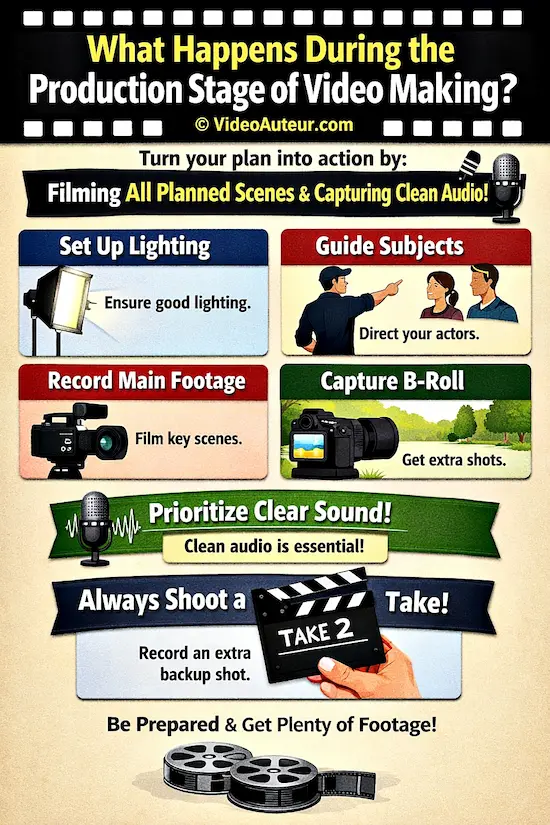
During production, you turn your plan into action by filming all planned scenes and capturing clean audio.
You set up lighting, guide subjects, record principal footage, and gather extra B-roll.
Prioritize clear sound, and always shoot a safety take -- an extra identical shot -- to give yourself a backup in editing.
During the production stage, the quiet planning of the previous phase transforms into action. This is the "capture" phase, where your goal is simple: to gather clean, usable raw material that tells your story.
While this is often the most exciting part of the process -- the part most people imagine when they think of "making a video" -- it is also the most intense.
It is usually the shortest phase, but the energy here is high because you are physically creating the footage you planned. Think of it as the moment the blueprint becomes a building.
The Heart of the Shoot: What You Are Actually Doing
Even though it feels like "just filming," there are specific, gentle tasks happening behind the scenes to ensure your footage is kind to your future self in the editing room:
- Lighting: You are setting up your scene so the camera can "see" clearly and beautifully. This doesn’t always mean expensive lights; it often means positioning yourself near a window or using a lamp to soften shadows. The goal is to make your subject look natural and inviting.
- Audio Recording: This is perhaps the most critical task. You are ensuring your microphone captures clear, crisp sound. In fact, clean audio is often more important than video quality. Viewers will forgive a slightly grainy image, but bad audio is the number one reason a video feels "amateur" and unwatchable. Prioritize this.
- Blocking: If you have actors or subjects, you are gently guiding them on where to stand and how to move. This ensures they are in the right spot to be seen and heard without running into the camera or each other.
- Principal Photography: This is the act of filming your main scenes. You are capturing the dialogue and the key actions you planned in your script.
- Capturing B-Roll: You aren’t just filming the main action; you are also getting "extra" footage (B-roll) like close-ups of hands, empty rooms, or nature shots. These are the visual cushions that will help you smooth over cuts later.
A Gentle Secret: The "Safety" Take
One of the kindest things you can do for your future self is to record a "Safety Take." After you get what you think is a perfect shot, do it one more time.
"That was great! Let’s do one more just to be sure."
This extra take gives you immense peace of mind in the editing room.
It means if you accidentally miss a word or the lighting shifts slightly in the first version, you have a backup ready to go. It turns potential stress into a simple choice.
Production is where the magic of "doing" happens. It is intense, yes.
But if you remember to focus on clear sound, good light, and extra takes, you will walk away with a treasure trove of footage that is ready to be shaped into something beautiful.
What happens during video post-production? The finalization process.
The finalization process in video post-production transforms raw footage into a finished story.
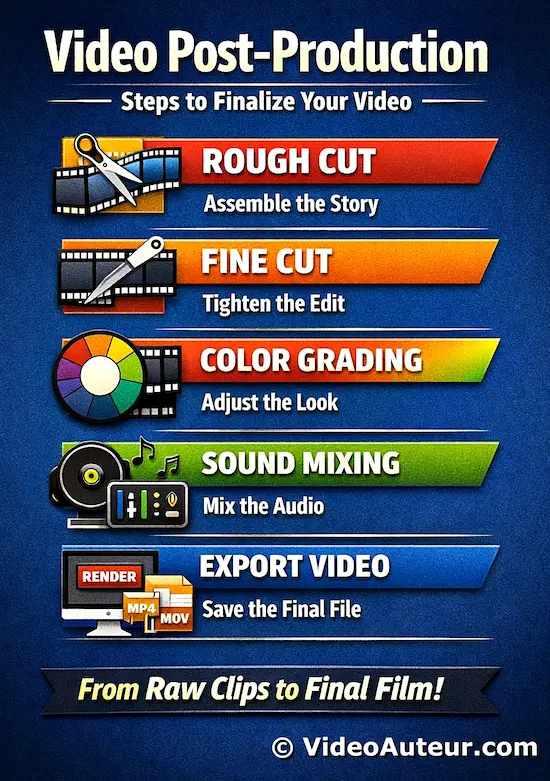
You assemble clips into a rough cut, tighten timing with a fine cut, apply color grading to set mood, mix and balance audio, and export the final file.
This reflective journey polishes every element, turning a rough assembly into a cohesive, emotionally resonant video.
During video post-production, the raw, messy pieces of your footage are gently woven together to become a cohesive, breathing story.
This is the finalization process, where the "magic of storytelling" truly happens.
If pre-production is the blueprint and production is the building, post-production is the interior design, the painting, and the final polish that turns a house into a home.
Unlike the high-energy burst of filming, this phase is iterative and reflective.
- It’s a quiet journey of discovery where you might build a rough cut, step back, receive feedback, and then refine the pacing until it feels just right.
- It is a space for patience, where you can slowly shape the emotion and rhythm of your video.
The Journey from Raw Clips to Final Story
Think of this as a multi-step assembly line where each task adds a layer of life to your project:
- Assembly and The Rough Cut: You start by laying out your clips in the right order. This is where you find the "spine" of your story. You aren’t worrying about perfection yet; you’re just seeing how the pieces fit together to tell the narrative.
- The Fine Cut: Once the story flows, you tighten the pacing. This is where you trim away unnecessary moments, ensuring every second serves the story. This step often takes the most time, as finding the perfect rhythm is an art in itself.
- Color Grading: This is where you give your video its specific "look" and mood. You might make a scene feel warm and cozy with golden tones, or cold and dramatic with blue hues. It’s not just about fixing colors; it’s about evoking a feeling.
- Sound Design and Mixing: Often the most overlooked part, this involves balancing your dialogue, adding music, and layering in sound effects (like footsteps or the hum of a room). You are cleaning up voices and ensuring nothing is too loud or too quiet. Great sound can make a video feel professional, even if the visuals are simple.
- Exporting: Finally, you render the video into the exact file format your audience needs, whether that’s for YouTube, a classroom presentation, or social media.
How do pre-production decisions affect post-production workflows in video making?
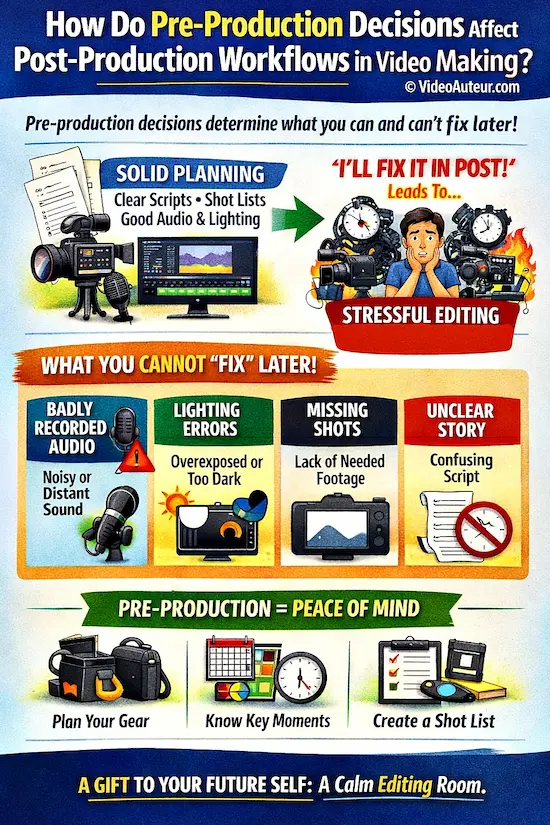
Pre-production decisions define what you can and can’t fix later.
Solid planning -- clear scripts, shot lists, and proper audio/lighting -- prevents permanent issues like missing coverage or bad sound.
This turns editing from a stressful rescue effort into a smooth, creative process where you enhance good material rather than trying to salvage flawed footage.
The short answer is: Your choices in pre-production determine how much pain or joy you feel during editing.
Many beginners fall into the trap of thinking, "I’ll just fix it in the edit." They believe that a messy plan or a shaky shoot can be magically rescued by the editing software. This is a dangerous illusion.
In reality, post-production is for enhancing, not rescuing. When you try to fix fundamental problems after the fact, you often find that no amount of digital magic can truly restore what was lost.
Pre-production decisions act as the foundation for your entire workflow.
- If that foundation is solid, editing becomes a smooth, creative flow.
- If it is shaky, editing turns into a stressful, time-consuming emergency room.
What You Cannot "Fix" Later
To protect your time and your peace of mind, it helps to know which problems are permanent once the camera stops rolling. These are the things that must be handled before you hit record:
- Badly Recorded Audio: This is the most common regret. If your microphone was too far away, if there was wind noise, or if someone spoke over loud music, the damage is often irreversible. You can reduce noise, but you cannot create clean dialogue from thin air.
- Lighting Errors: If a shot is severely overexposed (blown-out highlights) or too dark (crushed shadows), the camera didn't capture the data needed to fix it. No amount of color grading can bring back details that were never recorded.
- Missing Shots: If you needed a wide shot to establish a location or a close-up to show an emotion, and you didn't get it, you cannot edit it into existence later. You will either have to reshoot (which is costly) or tell your story with a gap in the visual flow.
- An Unclear Story: If your script was confusing or underdeveloped before filming, editing cannot give it clarity. You can rearrange clips, but you cannot create a heart or a message that wasn't there to begin with.
The Power of Foresight
Even in unpredictable situations, like filming an event where you can't script every word, pre-production saves you. By knowing the client's goals, the program schedule, and the key moments they want captured before you arrive, you can:
- Prepare the right gear so you aren't scrambling for equipment.
- Set your camera style in advance, matching the look to the subject so you don't have to tweak everything later.
- Create a mental shot list for the key moments, ensuring you capture the essential footage.
This kind of preparation turns a potential budget sink into a savings of time and energy. A clear shot list makes the post-production workflow faster and cheaper, turning what could be a panicked scramble into a calm, creative process.
A Gentle Reminder: When you take the time to plan well, you aren't just "doing homework." You are giving your future self the gift of a calm editing room. You are ensuring that when you sit down to edit, you are building a masterpiece, not putting out fires.
Why does video post-production take so much time?
Video post-production takes time because you’re making thousands of micro-decisions to perfect pacing, emotion, and flow.
It’s an iterative cycle of rough cuts, feedback, and refinement -- not just trimming clips.
Decision fatigue sets in as you judge every frame, sound, and color.
This thoughtful process is a sign of care, not inefficiency.
It is very common for beginners to be surprised when they realize that post-production often takes longer than the actual filming. You might have spent a whole day shooting, only to spend three or four days editing the same project.
Please know this: this is completely normal.
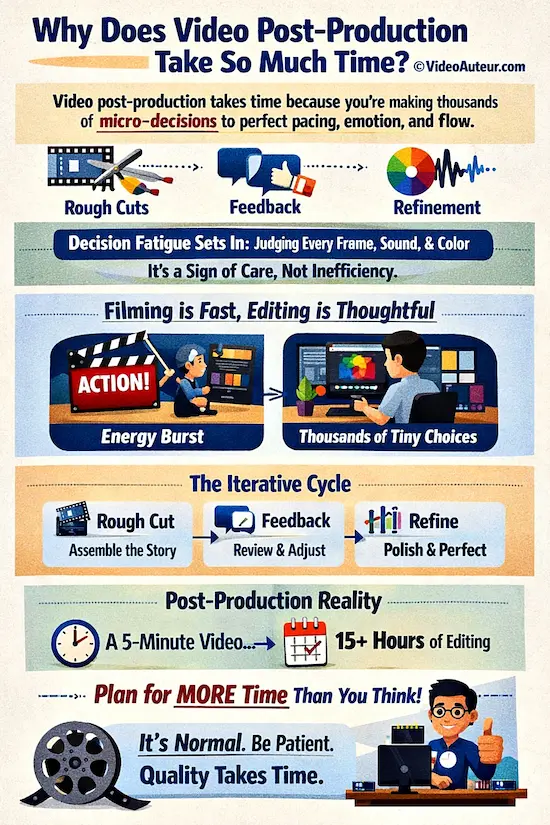
The reason post-production takes so long isn't because you are working slowly or inefficiently. It is because you are making thousands of micro-decisions to ensure your story flows smoothly.
Editing is not just about cutting clips; it is about finding the perfect rhythm, the right emotion, and the right moment for every single transition. It is a sign of care, not a sign of struggle.
The Hidden Work: Decision-making Fatigue
While filming is an "energy burst" of action, post-production is a marathon of thought. There is a rare insight that most websites don't mention: Decision-making Fatigue.
In the editing room, you are making tiny choices every single second:
- Which frame is the best one to cut on?
- Which take felt the most natural?
- Should the music swell here or fade out?
- Is the color tone too warm or just right?
Even a short video involves thousands of these small judgments. This mental load is why the "final polish" phase can feel so exhausting.
It is like sanding a piece of wood; you have to go over it again and again, checking for smoothness, until it feels just right to the touch.
You cannot rush this process if you want a high-quality result.
The Iterative Nature of Editing
Unlike the linear nature of filming, post-production is iterative. It is a cycle of:
- Rough Cut: Putting the story together.
- Feedback: Stepping back to see what works and what doesn't.
- Refine: Tweaking the pacing, sound, and visuals.
This back-and-forth is necessary. It takes time to find the "sweet spot" where the story lands perfectly with your audience.
A Practical Lesson for Beginners
Based on real experience (mine), a simple five-minute event recap video can easily require 15 or more hours of post-production work. That might sound daunting, but it helps to manage your expectations now so you don't feel overwhelmed later.
Here is a gentle rule of thumb:
Budget more time for post-production than you think you'll need, and then add a little more.
If you plan for 10 hours, plan for 15. If you plan for a weekend, give yourself the full week. This buffer is your safety net against the unexpected and the natural pace of finding the perfect story.
Be kind to yourself as you work through this phase. The time you spend is an investment in the quality of your work and the satisfaction of seeing your vision come to life.
When you slow down and give it the time it deserves, the result will be worth every minute.
Who does what? Roles and collaboration in the video production cycle.
In professional video production, the Producer manages logistics, the Director guides the creative vision, the Cinematographer handles camera and lighting, and the Editor assembles the final story.
As a solo beginner, you'll fill all these roles -- understanding each helps you shift mindsets and structure your work effectively.
In a professional video production, the work is shared among a team where each person has a specific job:
- the Producer manages the business and budget,
- the Director guides the creative vision and actors,
- the Cinematographer handles the camera and lighting, and
- the Editor assembles the final story.
However, if you are a beginner, a student, or a self-learner, you will likely wear all of these hats. And that is not just okay; it is a wonderful way to learn.
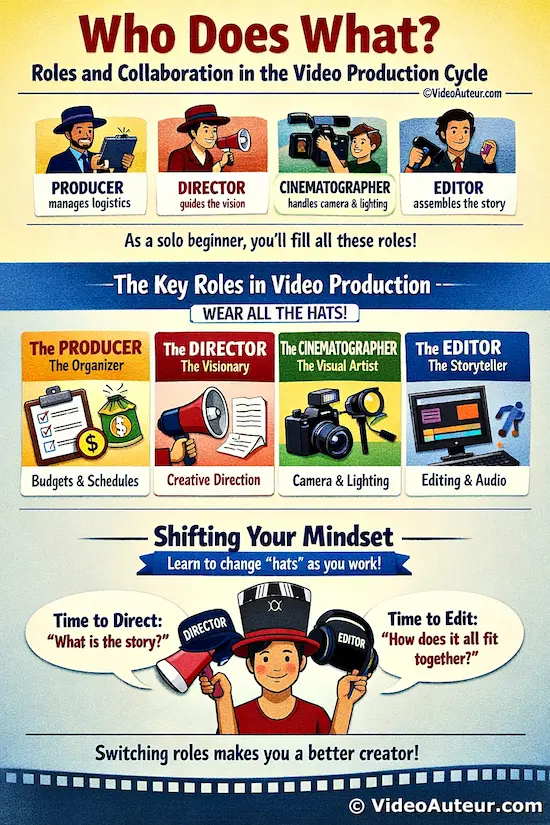
Even if you are a "one-person band" right now, understanding the distinct responsibilities of each role helps you organize your own work better.
It teaches you to shift your mindset as you move from one stage of the process to the next, ensuring you give each part of the project the attention it deserves.
The Four Pillars of Video Creation
Think of these roles as four different "hats" you put on at different times. When you understand what each hat does, you can switch into the right mindset for the job at hand.
1. The Producer (The Organizer)
- The Job: This role handles the "how" and "when." They manage the budget, create the schedule, hire the team, and ensure the project stays on track and on time.
- The Solo Creator Version: When you are working alone, this is the part of you that checks your calendar, makes sure you have enough battery power, and decides if you can afford to rent that extra light. It’s the voice that says, "Let’s get organized so we don't get stressed."
2. The Director (The Visionary)
- The Job: This role is the heart of the story. They decide what the story is, guide the actors, and make all the creative choices about the mood and message.
- The Solo Creator Version: This is you when you are writing your script, planning your shots, or telling a friend how to stand in front of the camera. It’s the part of you that asks, "What am I trying to say, and how do I make people feel it?"
3. The Cinematographer / DP (The Visual Artist)
- The Job: Short for "Director of Photography," this person is the artist behind the camera. They work with the director to set up the lighting, choose the lenses, and frame every shot to look beautiful.
- The Solo Creator Version: This is you when you are setting up your phone or camera, adjusting the window light, or deciding exactly where to stand to get the best angle. It’s the part of you that focuses on the look of the image.
4. The Editor (The Storyteller in the Room)
- The Job: This person takes all the raw footage and pieces it together into a cohesive narrative. They decide the pacing, add music, fix colors, and mix the sound.
- The Solo Creator Version: This is you sitting at your computer, sorting through clips, and finding the rhythm of your story. It requires a different kind of patience than filming.
The Magic of Shifting Hats
One of the most powerful things you can do as a solo creator is to give your brain permission to shift roles.
It is very common to feel stuck when you are both the Director and the Editor. The Director wants to capture the perfect emotion, while the Editor needs to solve technical puzzles.
When you sit down to edit, try to mentally "take off" your Director hat for a moment. Tell yourself: "I am no longer shooting; I am now solving the puzzle of how these pieces fit together."
This shift helps you avoid the frustration of trying to "fix" things in the editing room that should have been planned earlier.
By respecting the distinct nature of each role, even when you are doing them all alone, you become a more organized, capable, and calm creator.
Remember: Every professional team started as a group of individuals learning to wear these hats one by one. You are building a foundation that will serve you for the rest of your creative journey.
FAQs - What is the difference between pre-production, production, and post-production?
What is the difference between pre-production and production in video making?
What is the difference between pre-production and production in video making?
Pre-production is the planning phase (writing, scouting, scheduling), while production is the execution phase (filming and capturing audio).
You cannot start production until pre-production is "locked."
What is the difference between pre-production and post-production in video making?
What is the difference between pre-production and post-production in video making?
Pre-production is about creating the blueprint and gathering resources before filming.
Post-production is about assembling, refining, and polishing the footage after filming is complete.
How long does it take to make a video from start to finish?
How long does it take to make a video from start to finish?
The timeline varies wildly. A simple student project might take a few days, while a professional short film can take months.
A good rule of thumb is that for every hour of final video, expect to spend 10+ hours across all three phases if you are learning.
What is the proper video post-production workflow?
What is the proper video post-production workflow?
The standard flow is:
Organize files > Rough Cut (story assembly) > Fine Cut (pacing) > Visual Effects/Graphics > Color Correction/Grading > Sound Mixing > Export.
Is the process different for a commercial video shoot vs. a short film?
Is the process different for a commercial video shoot vs. a short film?
Yes. Commercials are often highly structured, with strict brand guidelines and shorter timelines, meaning pre-production is extremely detailed.
Short films allow for more creative experimentation and flexibility during production and post-production.
Conclusion - What is the difference between pre-production, production, and post-production?
Building a video, like building a house, is at its heart an act of care.
When you honor the quiet planning of pre-production, the focused energy of production, and the patient craft of post-production, you give your idea the home it deserves.
You stop fighting against chaos and start creating from a place of clarity.
The difference between these three phases isn’t just a set of definitions to memorize -- it’s a gentle, time-tested way of working that puts the joy back into storytelling.
Now that you understand the flow from blueprint to final polish, the only thing left is to begin.
So, as you stand in that empty field with your camera in hand and a story waiting to be built: what kind of home will you create?
You might like these
How to Start Video Production for Beginners Step by Step
How to start video production for beginners step by step guide. Focus on purpose, audience, and message. Skip the overwhelm. Create videos that truly connect.
How to Create a Video By Yourself: A Beginner's Guide
Discover how to create a video by yourself from start to finish. Overcome fear, use what you have, and share your unique story with confidence.
How Does a Steadicam Work? Smooth Shots Explained
How Does a Steadicam Work? Learn the physics of gimbal balancing, operator technique, and smooth camera movements for professional video storytelling.


Alvin Motilla is the creator of VideoAuteur.com, where he helps everyday people make videos that truly connect with audiences. With over 20 years of experience spanning scriptwriting, documentaries, corporate, and freelance video production, he champions the human side of creation over gear obsession. A graduate of AB Mass Communication, he believes that showing up with heart matters more than owning expensive equipment. Off-screen, Alvin enjoys biking with his wife and daughter, staying active, and studying Scripture.

Get Your Free Cheat Sheet
The Most Common Video Mistakes (and How to Fix Them)

Sign up to download it instantly. You’ll also get tips, step-by-step guidance, and gear guides to make video creation simple.
What's New


-
What is B-roll and why does my video need it? A Guide
 Wondering what is B-roll and why does your video need it? This guide reveals simple tips to add visual variety, hide edits, and keep viewers watching longer.
 -
What is the Rule of Thirds in Digital Composition? Visual Guide
 What is the Rule of Thirds in digital composition? A visual guide to placing subjects on power points for better storytelling. Learn how to use the grid.
 -
What is Digital Video Production? A Beginner's Complete Guide
 What is digital video production? Learn the basics, tools, and step-by-step process to create videos—from concept to sharing. Perfect for beginners!



Get Your Free Cheat Sheet
The Most Common Video Mistakes (and How to Fix Them)

Sign up to download it instantly. You’ll also get tips, step-by-step guidance, and gear guides to make video creation simple.
Copyright © 2014- VideoAuteur.com All rights reserved
This website does not sell any personal information.
Get Your Free Cheat Sheet
The Most Common Video Mistakes (and How to Fix Them)
Sign up to download it instantly. You’ll also get tips, step-by-step guidance, and gear guides to make video creation simple.